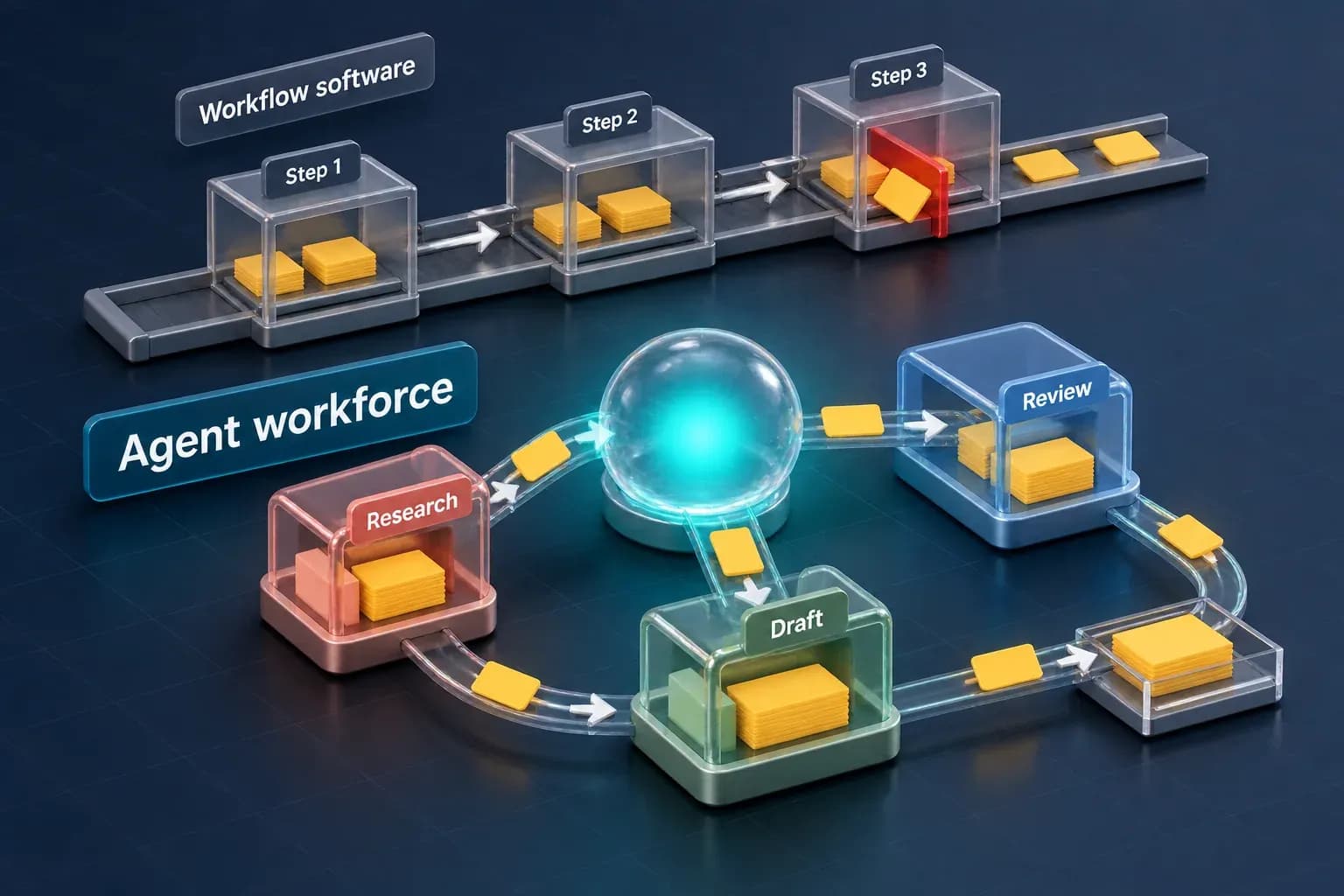
What Workflow Software Actually Means
"Workflow software" covers a wide shelf: no-code automation platforms that connect apps with if-this-then-that logic, iPaaS tools that move data between systems, and BPM/BPA platforms that model a business process as a flowchart and route work through it. Different products, same shape underneath. A workflow is defined once, as a sequence of deterministic steps, and every case that enters it runs the same path.
That shape is the whole value. A defined workflow is auditable, repeatable, and cheap to run at volume. If a new lead should route to the right rep, if an invoice over a threshold should route to a second approver, if a form submission should create a record in three systems at once, a rules-based workflow is the right tool and the AI angle is unnecessary overhead.
Where Workflow Software Hits a Ceiling
The ceiling shows up the moment a step can't be written as a rule. A few common places it appears:
- Exceptions multiply faster than rules can cover them. Every edge case a workflow hits becomes a new branch, and every new branch is another thing to test and maintain. Past a certain size, the workflow diagram stops describing the business and starts describing its own accumulated patches.
- Unstructured input breaks the trigger. A workflow can route a form field cleanly. It cannot read a vendor's free-text email, a scanned PDF, or a customer's ambiguous support message and decide what should happen next — that step needs something to read and interpret the input first.
- "Someone has to look at this" is not a step a workflow can perform. When a process needs a judgment call — is this invoice legitimate, does this contract term deviate from policy, is this the right next action given everything else going on — a workflow can pause and notify a human, but it cannot make the call itself.
- Drift. Business rules change faster than someone remembers to update the workflow that encodes them, so the automation quietly runs on rules the business no longer follows.
None of this is a flaw in workflow software. It is doing exactly what it was built to do: execute a known path reliably. The ceiling is structural, not a bug to patch with more branches.
What an AI Agent Workforce Adds
An AI agent workforce is built for the part of the process that needs judgment inside the flow, not just a human waiting at the end of it. Instead of a fixed path, an agent reads context, decides which action applies, and executes it, the same way a capable operator would work through a queue of dissimilar cases.
Archon Workforce, for example, puts six specialist agents under one orchestration layer rather than shipping one general-purpose bot. Different work goes to a different agent, coordinated centrally, instead of forcing one model to be equally good at every task in the process.
The governance model is what makes this usable in an operations context, not just an interesting demo. Every agent action moves through the same kind of approval and audit controls an operations or compliance team already expects: an action can require sign-off before it executes, and every action leaves a trail. Deployment runs to managed cloud, a private VPC, or fully on-premises, and the routing underneath is model-agnostic by design rather than locked to one vendor's model.
That combination, judgment plus governance, is the piece workflow software structurally cannot provide, because a rules engine has no judgment to govern in the first place.
Running Workflow Software and AI Agents Together
The two are not a replacement decision. Most operations teams that add AI agents keep their existing workflow software running the deterministic plumbing it's good at and add agents only at the points that need a call made.
A practical way to draw the line:
- Map the process as it actually runs, not as the workflow diagram describes it. Note every point where a human currently has to stop and think, not just click approve.
- Leave the deterministic steps in workflow software. Routing, data movement, and scheduled triggers do not need an agent; adding one there adds cost and risk without adding capability.
- Put agents only at the judgment points, with an approval queue on anything consequential until the team has enough history with the agent's decisions to trust it further.
- Keep an audit trail on both halves. A process that is half rules-engine and half agent still needs one coherent record of what happened and why, not two separate logs that have to be reconciled by hand.
Run this way, workflow software and an AI agent workforce are complementary layers of the same stack rather than competing purchases.
Questions to Ask Before You Add Agents to the Stack
Before extending a workflow with an AI agent, it's worth getting concrete answers to:
- Where does customer or business data actually go? Confirm whether any vendor uses your data to train its own models, and confirm the deployment options available (managed cloud, private VPC, on-premises) match what your compliance posture requires.
- What sits between "the agent decided" and "the action executed"? An approval queue and an audit log are the minimum bar for putting an agent in front of anything consequential.
- Is the platform locked to one model, or model-agnostic? A single-model dependency is a different risk profile than a system built to route across models as the landscape changes.
- What happens when the agent is wrong? Ask for the exception path, not just the happy path, before the agent touches production data.
FAQ
Is AI agent software the same thing as workflow automation software? No. Workflow automation software executes a defined, rules-based sequence the same way every time. An AI agent reads context and decides which action applies, which is a different capability, not a faster version of the same one.
Do I need to replace my workflow software to use AI agents? No. The common pattern keeps workflow software running the deterministic steps and adds agents only at the points in the process that need judgment, with both feeding one audit trail.
What makes an AI agent workforce different from a single AI chatbot bolted onto a workflow? A single general-purpose model asked to do everything tends to be mediocre at most of it. A workforce model, like Archon's six specialist agents under one orchestration layer, routes different work to the agent built for it, coordinated centrally rather than left as one undifferentiated bot.
Is it safe to let an AI agent execute actions without a person in the loop? Treat any consequential action as requiring an approval queue until the team has a track record with that specific agent's decisions. Governance controls, sign-off and audit logs, are what make agent execution something an operations team can actually stand behind, not an optional extra.
Workflow software is not going away, and it shouldn't. The question worth asking is narrower: which steps in your process are genuinely deterministic, and which ones have been quietly waiting on a human to make a call the workflow can't make for them. Book a Consultation to walk through where an AI agent workforce fits next to what you're already running, or see how Archon Workforce and AI Consulting apply to your process specifically. For a broader look at automating end-to-end operations with agents, see AI Workflow Automation: The Complete Guide for Business Teams.