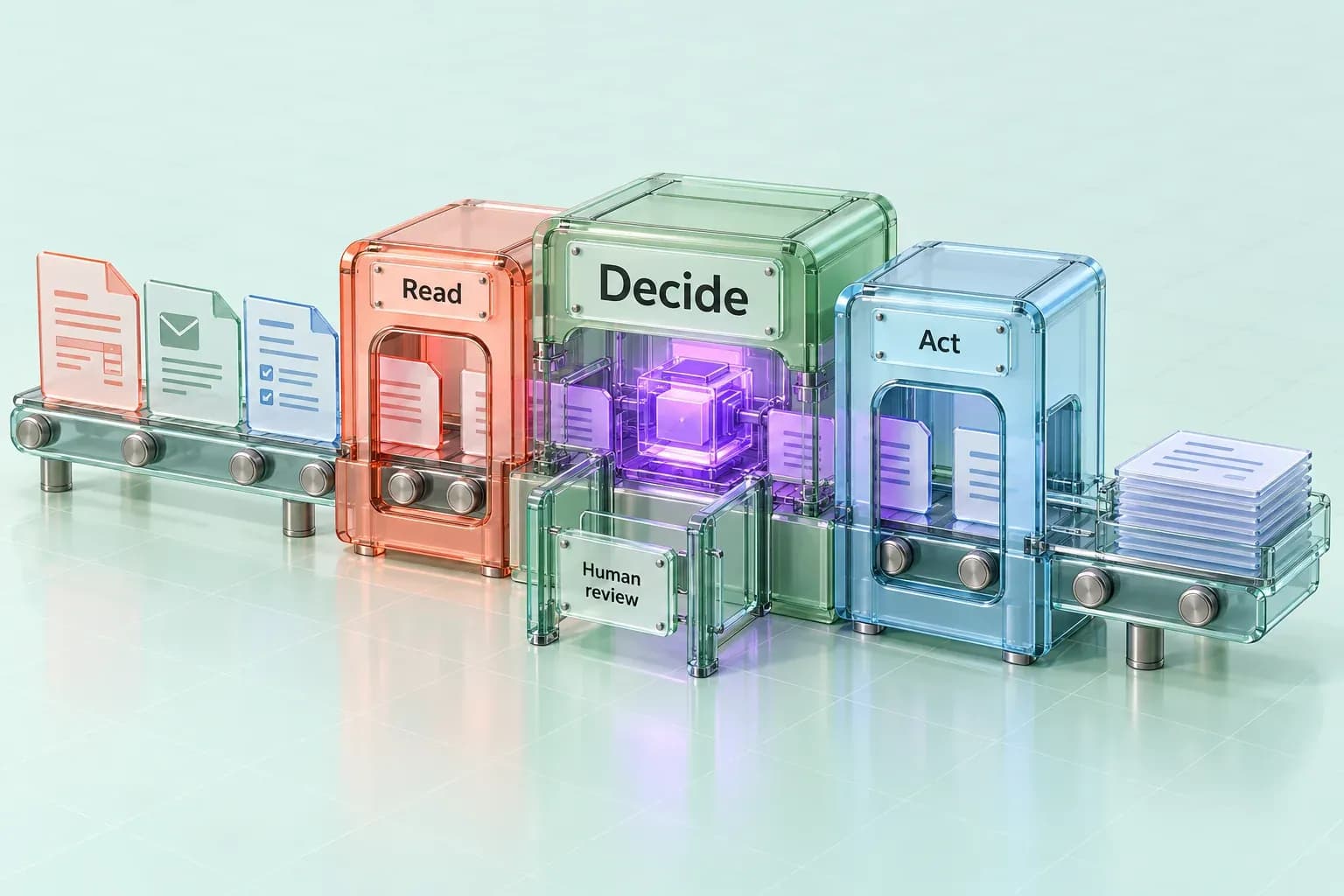
Intelligent process automation is process automation with a judgment layer added: instead of only executing fixed steps, the system reads unstructured input, classifies exceptions, and decides which path a case should take before a human ever sees it. That judgment layer is what separates intelligent process automation from the rule-based automation that came before it, and it's why the term keeps showing up next to "AI agents" rather than next to "scripts" or "macros."
What intelligent process automation actually means
Intelligent process automation, often shortened to IPA, combines traditional process automation (the trigger-and-action logic of workflow tools) with AI components that can read, classify, and decide: optical character recognition and natural language processing to turn documents and messages into structured data, machine learning or an AI agent to classify what type of case this is, and a decisioning layer that routes exceptions instead of stalling on them.
The practical difference shows up the moment a process hits something it wasn't explicitly coded for. A rule-based system stops or routes to a human queue. An intelligent process automation system reads the exception, classifies it against cases it has seen before, and either resolves it within a defined confidence threshold or routes it to a person with the relevant context already attached.
How intelligent process automation differs from robotic process automation
Robotic process automation and intelligent process automation are often used interchangeably, and that's a mistake worth correcting before evaluating either one.
- Input. RPA expects structured, predictable input: forms, fixed-format files. Intelligent process automation handles structured and unstructured input alike: emails, scanned documents, free text.
- Logic. RPA runs fixed rules coded in advance. Intelligent process automation runs those rules plus a classification or decisioning layer.
- Exceptions. RPA fails or routes to a human queue. Intelligent process automation classifies the exception and often resolves or pre-triages it.
- Adapting over time. RPA requires reprogramming to change. Intelligent process automation can improve as the underlying models or agents improve.
- Best fit. RPA suits high-volume, single-format tasks. Intelligent process automation suits multi-step processes with variation in the input.
RPA is still the right tool for a narrow, high-volume, single-format task, moving a value from one system to another on a schedule. Intelligent process automation is the right tool when the process spans several systems, the inputs vary in format, or a meaningful share of cases fall outside the happy path. Most operations teams eventually need both: RPA for the mechanical steps, an intelligent layer for the judgment calls sitting between them. AI workflow automation for business teams covers that broader shift from single-step bots to multi-step, governed workflows in more depth.
Where intelligent process automation pays off first
The processes that benefit soonest share three traits: they run often enough that improvement compounds, the inputs vary enough that a fixed rule set keeps breaking, and the cost of a wrong exception is high enough to justify a decisioning layer instead of a human queue.
- Accounts payable and invoice processing. Invoices arrive in a dozen formats from a dozen vendors. Intelligent process automation reads the document, matches it against a purchase order, and only escalates the mismatches.
- Claims and case intake. Insurance, legal, and benefits intake all involve unstructured submissions that need to be classified and routed correctly before any downstream work can start.
- Compliance and KYC checks. Document verification and rule matching at volume are exactly the profile intelligent process automation is built for, with an audit trail as a requirement, not an afterthought.
- Customer service triage. Reading an inbound message, classifying intent, and routing to the right queue or resolving directly cuts the time between "customer wrote in" and "the right person is looking at it."
- HR and vendor onboarding. Document collection, verification, and system provisioning span several tools and rarely follow one clean path.
The common thread: these are processes with real judgment calls buried inside otherwise repeatable work, which is precisely what a fixed-rule automation tool can't handle and a person shouldn't have to handle by hand every time.
What governs the automation, not just what runs it
The judgment layer is also the risk layer. A system that classifies and routes cases on its own needs the same governance discipline a human decision-maker would be held to: a record of what happened, a way to stop it, and a clear line for what requires sign-off before it goes out.
That's the part of intelligent process automation that gets underbuilt. Teams evaluate the classification accuracy and skip the operating model around it: who approves an exception above a certain dollar amount, what gets logged, who can see the queue, and where the system runs.
Archon Agents builds this as the default, not an add-on. Archon Workforce runs as six specialist agents under one orchestration layer, with SSO, RBAC, approval queues, and audit logs on every workflow, and deployment options that include managed cloud, a private VPC, or fully on-premises, model agnostic by design. Customer prompts, files, outputs, and workspace data are not used to train foundation models. The point isn't the checklist of features, it's that a process running unattended on real customer, financial, or compliance data needs the same approval-queue and audit-trail discipline governed AI agents require before it needs a faster classifier.
How to evaluate an intelligent process automation platform
A short list to bring to any vendor conversation, in the order that actually matters:
- Where does approval sit? Every path that is sensitive, irreversible, or customer-facing should have a defined human checkpoint, not an optional one.
- What gets logged, and who can see it? An audit trail that exists only in theory isn't one.
- Where does the data live, and who touches it? Managed cloud, private VPC, or on-premises are different risk profiles; know which one the process actually requires.
- Is the underlying model swappable? A platform locked to one model vendor inherits that vendor's pricing and roadmap risk.
- Can it handle the exception volume you actually have, not the demo volume? Ask for the classification and escalation rates on a real, messy dataset, not a curated one, and confirm you can see what it's actually producing week to week, not just that access to the system exists.
If you're comparing platforms as part of a larger AI operating model rather than a single process, that evaluation is close to what our AI consulting practice walks through with operations and technology leaders.
FAQ
Is intelligent process automation the same as RPA? No. RPA executes fixed rules against structured input. Intelligent process automation adds a layer that reads unstructured input and classifies or routes exceptions, which is what lets it handle variation RPA can't.
Does intelligent process automation replace existing RPA bots? Usually not entirely. Most operations teams keep RPA for the mechanical, single-format steps and add an intelligent layer for the judgment calls and exceptions sitting around those steps.
What's the difference between intelligent process automation and hyperautomation? Hyperautomation is the broader program: combining RPA, IPA, process mining, and low-code tools across an organization. Intelligent process automation is one of the components inside that program, focused specifically on adding judgment to a given process.
How long does an intelligent process automation deployment take? It depends on how many systems the process touches and how much of the input is unstructured, but the proven pattern is to prove one workflow end to end before extending to adjacent ones, rather than automating everything at once.
Does intelligent process automation require training a custom AI model? Not necessarily. Many deployments use existing models for classification and reserve custom training for cases where accuracy on a specific document type or decision genuinely requires it.
Start with the process, not the tool
Intelligent process automation is a real category with a real difference from basic RPA, and the value shows up specifically at the exceptions: the invoices that don't match, the claims that don't fit the template, the customer message that isn't a simple request. A governed AI agent workforce is what makes that judgment layer safe to run unattended, with the approvals and audit trail already built in. If you're weighing where an intelligent layer fits into your own operations, book a consultation to walk through the process and what governance it would need.